
Being able to quickly submit data from PowerShell to SQL is something I often do. Usually I want the results inserted into a SQL table. Being able to do so in bulk without needing a for each insert loop is very helpful and much faster. The easiest way to do this is to use sqlclient.sqlbulkcopy. It requires that the input variable be a DataTable object so if it’s not already use the ConvertTo-DataTable function I wrote earlier. Once you have your data in the DataTable you can use it as the source in this Copy-DataTableToSQL function I wrote.
Click here to download Copy-DataTableToSQL
EXAMPLE:
Import-Module C:\PowerShell\ConvertTo-DataTable.ps1
Import-Module C:\PowerShell\Copy-DataTableToSQL.ps1

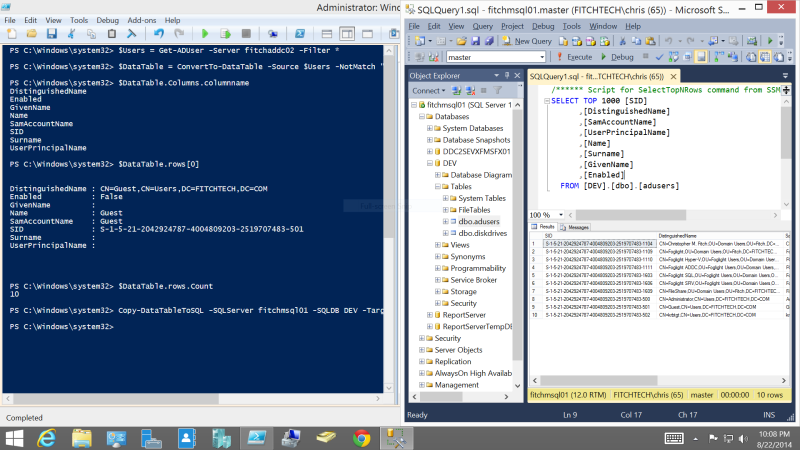
$Users = Get-ADUser -Server fitchaddc02 -Filter * #Using as example data
$DataTable = ConvertTo-DataTable -Source $Users -NotMatch "write|propert|object|psshow" #Filtering junk columns from Get-ADUser that I don't want
$DataTable.Columns.columnname #This lists the names of all columns
$DataTable.rows[0] #Test to show one row
$DataTable.rows.Count #Number of rows in DataTalbe, can compare to $Users.count

Copy-DataTableToSQL -SQLServer fitchmsql01 -SQLDB DEV -Target dbo.adusers -Source $DataTable
CODE:
function Copy-DataTableToSQL
{
<#
 .EXAMPLE
 Copy-DataTableToSQL -SQLServer fitchmsql01 -SQLDB dev -Target dbo.test_adcomputer -Source $DataTable
 .PARAMETER Source
 A DataTable that will be merged witht eh target tabled.
 .PARAMETER SQLServer
 Named instances SERVERNAME\INSTANCENAME | If it's a default instance only use server name, do not add \MSSQLSERVER.
 .PARAMETER SQLDB
 Name of the database where the target table is.
 .PARAMETER Target
 The Table in which you're targeting
 .PARAMETER Filter
 Default="*" Used in selecting the columns from the target.
 .PARAMETER Security
 Default="SSPI" Used in connection string to SQL DB.
 .PARAMETER Timeout
 Default="60" Used in connection string.
#>
param(
 [Parameter(Mandatory=$true)][string]$SQLServer,
 [Parameter(Mandatory=$true)][string]$SQLDB,
 [Parameter(Mandatory=$true)][string]$Target,
 [Parameter(Mandatory=$true)][System.Data.DataTable]$Source,
 [String]$Filter="*",
 [String]$Security="SSPI",
 [Int]$Timeout="60",
 [Int]$Batch="5000"
)
begin{
 #Create connection object to SQL instance if one isnt already open
 if ($SQLConnection.State -ne [Data.ConnectionState]::Open) {
 $SQLConnection = New-Object System.Data.SqlClient.SqlConnection
 $SQLConnection.ConnectionString = "Server=$SQLServer;Database=$SQLDB;Integrated Security=$Security;Connection Timeout=$Timeout"
 $SQLConnection.Open()
 }
}
Process{
 if ($SQLConnection.State -ne [Data.ConnectionState]::Open){throw "Connection to SQL DB not open"}
 else
 {
 $SQLBulkCopy = New-Object ("System.Data.SqlClient.SqlBulkCopy") $SQLConnection
 $SQLBulkCopy.DestinationTableName = $Target
 $SQLBulkCopy.BatchSize = $Batch
 $SQLBulkCopy.BulkCopyTimeout = $Timeout #Previously set to 0
 foreach ($Column in $Source.columns.columnname){[void]$SQLBulkCopy.ColumnMappings.Add($Column, $Column)}
 $SQLBulkCopy.WriteToServer($Source)
 }
}
end{
 if ($SQLConnection.State -eq [Data.ConnectionState]::Open){$SQLConnection.Close()}
}
}
 Fitch Tech